Built for Contractors
Estimate. Job. Invoice.
Run every job from start to finish — with photos, updates, and proof of work at every step. Your customers stay informed. Your records stay organized.
meJobSiteLog is a business application that helps contractors create estimates, share them with customers for approval, convert approved estimates into jobs, document jobsite work with GPS-tagged photos, and send invoices. The app works on iPhone, Android, and desktop.
Built for Real Jobs
Every job follows the same simple path. meJobSiteLog keeps it organized from the first photo to the final payment.
Estimate
Create professional estimates with photos, line items, and GPS tags. Send in minutes.
Job
Convert approved estimates into active jobs. Track progress with photos every step.
Invoice
Generate invoices from completed work. Include photos, line items, and job details.
Paid
Collect payment by card, check, or cash. Close out with a complete job record.
Each stage flows into the next. No re-entering data. No lost details. One continuous record from start to finish.
Photos That Tell the Story
Before, during, and after. Every photo is proof of your work, organized and ready to share.
Document starting conditions
GPS-tagged · Timestamped
Capture work in progress
GPS-tagged · Timestamped
Show the finished result
GPS-tagged · Timestamped
Every photo is GPS-tagged, timestamped, and organized by job. Proof of work your customers can see and your records can prove.
Photos automatically attach to estimates, jobs, and invoices.
What Your Customer Sees
Fewer phone calls. Fewer misunderstandings. Your customer sees exactly what is happening — without needing an app or an account.
No account required
Customers tap a link and see everything — estimates, photos, progress. Nothing to download. Nothing to sign up for.
Builds trust and confidence
When customers can see progress, they feel informed. Fewer disputes. Better reviews. More referrals.
Email Updates
Automatic progress emails with photos and status changes.
Text Updates
Quick SMS notifications when milestones are reached.
Live Progress Page
A shareable link where customers view photos and updates in real time.
Day-by-Day Timeline
A visual timeline of every update, organized by date.
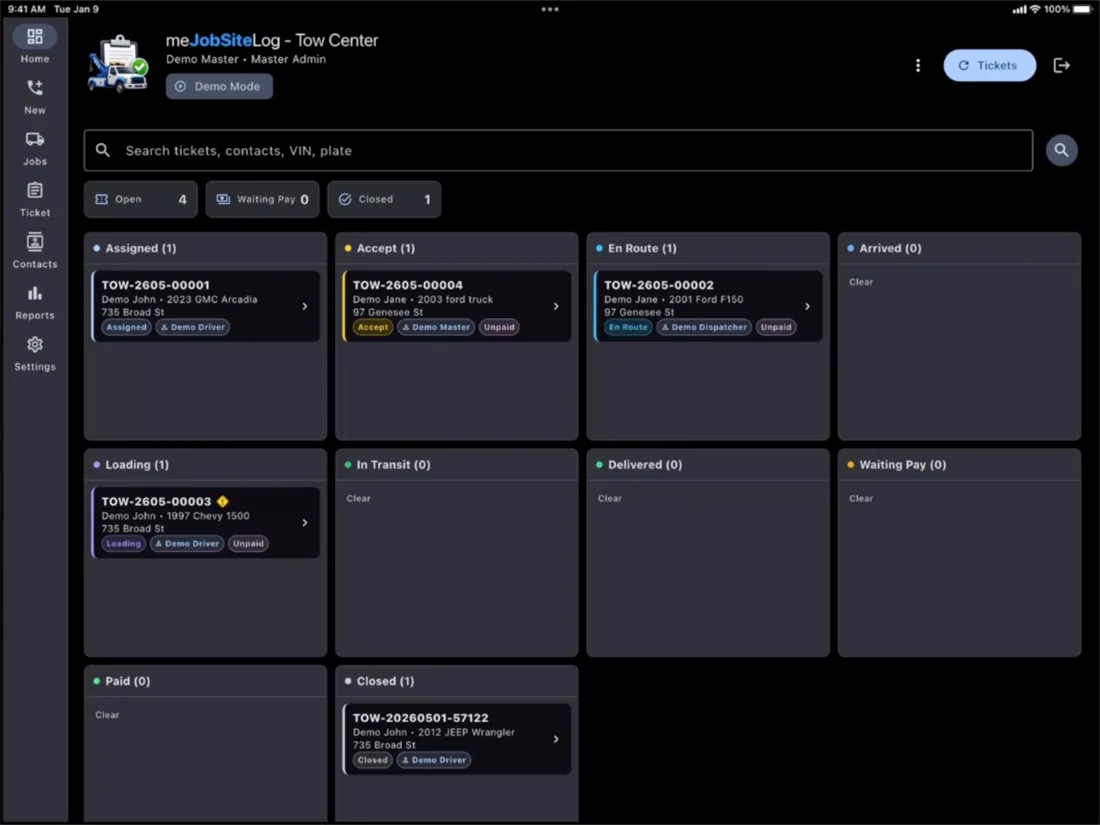
Tow Truck Services
Dispatch, document, invoice, and close every tow.
Tow Truck Center brings the meJobSiteLog workflow to towing: fast ticket intake, driver steps, route maps, photos, safety checks, signatures, invoices, and reports.
Dispatch
Create tow tickets, assign drivers and trucks, and watch every call move through the board.
Field workflow
Drivers use large step buttons for accept, en route, arrived, loading, in transit, and delivered.
Proof of service
Capture route maps, safety checks, pickup photos, drop-off photos, signatures, and ticket history.
Invoice and report
Review receipts, payments, billed miles, actual miles, unpaid work, and driver performance.
Present Your Work Like a Professional
Create polished documents and collect payment — all from the same place you manage your jobs.
PDF Estimates
Professional estimate documents with your branding, line items, and photos.
PDF Invoices
Clean invoices generated from job data. No re-typing. No errors.
Job Reports
Detailed summaries with timelines, photos, and completion status.
Collect Payment Your Way
Accept payment by credit card, cash, or check. Mark invoices as paid and keep clean records without chasing.
Simple, Start to Finish
Not complicated project software. A simple workflow system that contractors and clients actually use.
Create Estimate
Add photos, line items, and details. Send it in minutes.
Win the Job
Customer approves with one tap. The estimate becomes a job.
Document the Work
Capture before, during, and after photos. Log every detail.
Invoice & Get Paid
Generate the invoice. Collect payment. Close out the job.
No complicated software. No steep learning curve. Just a clear path from estimate to payment.
Contractors are talking.
Hear from the people who use meJobSiteLog every day.
“I used to text photos to my customers and hope they remembered what we agreed on. Now I send a link and they approve on the spot.”
Marcus Johnson
Johnson Electric LLC
“Three minutes to create an estimate — from the truck, on my phone. My old process took an hour at the desk after work.”
Sarah Chen
Precision Plumbing
“The GPS-tagged photos saved me on a dispute. I had proof of every step, timestamped and documented. Worth it for that alone.”
David Morales
Morales Roofing & Siding
Plans that grow with your crew.
Start free. Upgrade when you need more. Annual pricing shown.
Free
Try the full workflow at your own pace.
- Create & send estimates
- Photo documentation with GPS
- Magic link sharing
- Offline mode
Starter
+$9/user/mo
For solo contractors going paperless.
- Unlimited estimates, jobs & invoices
- Stripe online payments
Crew
+$9/user/mo
For crews that need roles, tags, and reports.
- Unlimited estimates, jobs & invoices
- Stripe online payments
- Team roles
- Reports
Business
+$12/user/mo
For companies that need branding and templates.
- Unlimited estimates, jobs & invoices
- Stripe online payments
- Team roles
- Reports
Enterprise
Custom media and storage, dedicated onboarding, and custom support. Custom pricing for organizations with 50+ users.
From Estimate to Invoice. With Proof of Every Step.
Sign up free. Create your first estimate in minutes. No credit card. No sales call. No complicated setup.
Works on iPhone, Android, and desktop.
Available Now
iPhone, Android, and Web
“The best tools don’t just track the work — they free you to do more of it.”
Application Information
meJobSiteLog is a jobsite log and estimate-to-job tracker for contractors. Create professional estimates with photos and GPS, share them with customers for digital approval, convert approved estimates into trackable jobs, document work with timestamped photos, and send invoices.
Sign in with Google
meJobSiteLog lets you sign in with your Google account to create and access your contractor account. We receive your Google profile information — your name, email address, and profile picture — and use it only to identify your account and provide the service. We do not sell or share Google user data with third parties for advertising or marketing.
You can revoke access at any time in Google Account Permissions. See our Privacy Policy for full details.